



Let’s be honest: picking a design tool is a headache if you aren’t a professional designer. Most of us just want to make a decent Instagram post, a YouTube thumbnail, or a flyer for work without spending three days watching tutorials on how the software actually works.
That’s basically why the Canva vs. Adobe Express fight exists. Both are built for “regular people” who need things to look professional but don’t have a degree in graphic design.
The quick answer?
For 90% of people, Canva is the way to go. It’s just easier, has more templates, and the collaboration tools are great. But, if you already pay for Adobe Creative Cloud or you’re obsessed with the Adobe ecosystem, Adobe Express is a powerhouse and a great alternative.
The “Too Long; Didn’t Read” Version
My 2-second recommendation:
Go with Canva if: You’re a beginner, a social media manager, or a small business owner who just needs a ton of templates and a simple “all-in-one” feel.
Go with Adobe Express if: You already use Photoshop or Illustrator and want your designs to play nice with those apps, or if you’re really into using Firefly AI.
SEO Meta Description
Canva vs Adobe Express in 2026: Compare features, ease of use, templates, pricing, and design capabilities to find the best tool for non-professional designers.
Quick Verdict
• Try Canva if you want:
o More templates
o Better collaboration tools
o Full-fledged all-in-one design ecosystem
• Try Adobe Express if you prefer:
o Easier-to-use interface
o Better integration with Adobe tools
o Faster design changes and branding
Overall Winner (2026): Canva
It offers more flexibility, features, and convenience for non-professionals.
Overview: Canva vs Adobe Express (2026)
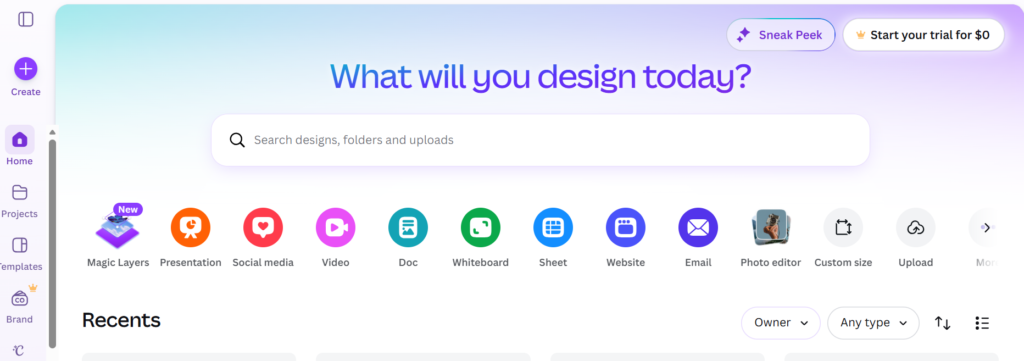
Canva: What Is It?
Canva is a convenient design tool used by millions of people worldwide to make social media graphics, presentations, videos, marketing materials, etc.
What is Adobe Express?
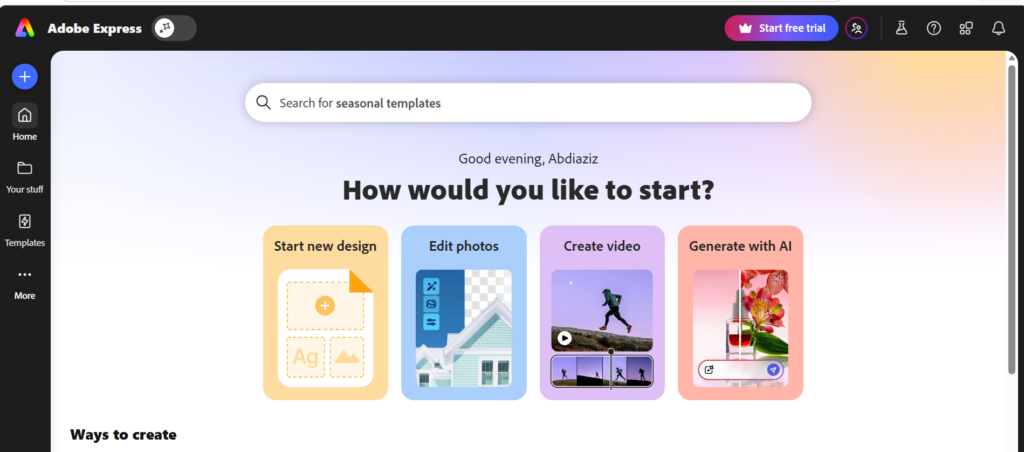
Adobe Express (previously known as Adobe Spark) is Adobe’s easy-to-use graphic editor aimed at:
• Producing content fast
• Creating branding materials
• Designing social media graphics
It’s all about speed and integration with other Adobe applications like Photoshop and Illustrator.
What’s the deal with Canva?
Canva is basically the gold standard for “design for non-designers.” Whether you need a presentation, a website, or a PDF, it’s all there. The magic is in the drag-and-drop feel you pick a template, swap the text, move a few photos around, and you’re done.
It’s a lifesaver for bloggers, students, teachers, and anyone running a side hustle. If you want to make something look “expensive” in five minutes, this is your tool.
What’s the deal with Adobe Express?
This is Adobe’s attempt to make their software accessible to people who *aren’t* experts. It’s way simpler than Photoshop, but it still has that Adobe DNA. You get access to Adobe Stock, a ton of great fonts, and the Firefly AI, which is genuinely impressive for generating and editing images. It’s perfect for people who want professional-grade assets without the steep learning curve.
Features Comparison
1. User-Friendliness
Canva
• Very user-friendly even for beginners
• Drag-and-drop editor
• Minimalistic user interface
Adobe Express
• Clean and contemporary user interface
• A bit more structured work process
• Best for small adjustments than complex designs
Winner: Canva (easier for beginners)
2. Templates and Design Materials
Canva
• More than 1 million templates (social media graphics, presentations, resumes, and many more)
• Comprehensive collection of high-quality images, icons, and videos
• Extreme customizability
Adobe Express
• Quality templates
• More minimalistic and branding-focused design style
• Less options than Canva
Winner: Canva (vast library of templates)
3. Content Quality and Design
Canva
• Good for:
o Presentation
o Marketing materials
o Other kinds of social media content
• Voice and video editing and animation
Adobe Express
• Good for:
o Creating unique logos
o Better typography
o Brand design
Winner: Adobe Express (visually more appealing designs)
4. SEO & Content Capabilities
Even though they are not SEO platforms themselves, they have some effect on content optimization and performance.
Canva
• Inbuilt content planner
• Social media scheduling
• Basic SEO-friendly templates
Adobe Express
• Broadly focuses on branding
• SEO capabilities limited
• Publishing features also limited
Winner: Canva
5. Integrations
Canva
• Integration capability with:
o Google Drive
o Dropbox
o Social platforms
o AI applications
Adobe Express
• Deeper integration with:
o Photoshop
o Illustrator
o Creative Cloud suite
Winner: Adobe Express (in terms of its user community)
6. Collaboration Features
Canva
• Real-time team collaboration
• Comments and sharing feature
• Team-specific folders and workflows
Adobe Express
• Basic sharing options
• Collaboration features limited
Winner: Canva
Pricing Comparison (2026)
Canva Pricing
• Free plan (extremely comprehensive)
• Canva Pro: $12-$15 per month
• Pricing plans for teams also available
Adobe Express Pricing
• Free plan (less features than Canva)
• Premium plan: $9.99 per month
Best bang for your buck? – Canva
Why?
• Better selection of templates
• More extensive set of features
• Multiple collaboration features
Give Canva free trial a shot to explore the design ecosystem.
Start off with Adobe Express if minimalistic design is preferred.
Performance & Output Quality
Canva
• Responsive and fast
• Well suited to big projects
• Slower when dealing with complicated designs
Adobe Express
• Faster at editing things quickly
• Good performance
• Poor complexity handling
Winner: Draw
• Canva = Complex projects
• Adobe Express = Fast edits
Comparison Table
| Feature | Canva | Adobe Express |
| Ease of Use | ⭐⭐⭐⭐⭐ (Very easy) | ⭐⭐⭐⭐ (Simple) |
| Pricing | Better value | Slightly cheaper |
| Templates | Massive library | High-quality but fewer |
| Best For | All-in-one design | Quick branded content |
| Collaboration | Excellent | Basic |
| Integrations | Wide | Strong with Adobe tools |
Pros and Cons
Canva Pros
• Big template library
• Makes it easy for beginners
• Offers powerful collaboration capabilities
• Convenient all-in-one designer
Canva Cons
• Some premium assets are restricted
• Tends to overwhelm users with options
Adobe Express Pros
• Nice minimalistic design
• Powerful branding tools
• Seamlessly integrates with other Adobe products
Adobe Express Cons
• Not as many templates to choose from
• Offers limited collaboration options
• Less flexible compared to Canva
Use-Case Recommendations
Pick Canva if you are:
• Unexperienced and a beginner at designing
• A content creator or marketer
• Running a company/business/branding
• Working with others in a team
Select Adobe Express if you are:
• Using any other Adobe products
• Focused on branding consistency
• Designing simple things quickly
• Looking for a more minimalistic design approach
Insight from an Expert (Personal Experience)
According to my experience in working with content creators, trainers, and digital specialists:
• Canva is much better for creating multi-purpose or long-form projects such as presentations, educational or training materials, etc.;
• Adobe Express is better when it comes to quickly completing simple tasks such as social media posts and branded materials.
As for your case that implies creating training programs, presentations, and online content, then it is much more convenient and practical for you to use Canva.
Which One to Choose?
For beginners
Prefer Canva
It’s more intuitive and easier to use.
For professionals
Prefer Canva (for multi-functional uses)
Prefer Adobe Express (for branded designs)
SEO and Content Marketing
First off, let’s be clear: neither of these is an SEO tool. They aren’t going to replace things like Semrush or Ahrefs, and they won’t do your keyword research or technical audits.
That said, they both indirectly help your SEO by letting you create great visuals like blog graphics, Pinterest pins, and YouTube thumbnails that actually get people to click.
The Verdict for Marketers:
I’d give the edge to Canva. Between the visual assets and the “Magic Write” AI for brainstorming and drafting content, it just fits the content marketing workflow a bit better.
Performance: Speed, Accuracy, and Workflow
Speed
Winner:Canva (by a hair).
Both are plenty fast. Canva’s templates make it incredibly quick to knock out standard marketing stuff. Adobe Express is also built for speed with its own templates, AI, and “Quick Actions.”
Accuracy
Just a heads-up: if you’re using AI to generate text or images, don’t trust it blindly. Neither platform is perfect. You have to double-check everything before you hit publish, especially if you’re dealing with:
* Stats or business claims
* Product/legal/medical/financial info
* Your specific brand voice
Winner: Tie. (A human still needs to be the final editor here).
Output Quality
Both can make things look professional. The real difference is your setup. If you’re already deep in the Adobe ecosystem, Express is the way to go. But if you just want something that looks great without needing a degree in design, Canva wins.
Winner:Tie.
Final Recommendation:
• Canva should be used as the main platform
• Adobe Express should be used as the secondary platform when working with Adobe products
The Final Verdict
After looking at everything templates, AI, pricing, and how they actually feel to use—Canva is the winner for most non-designers in 2026. It’s just easier to recommend. The template library is huge, the editor is intuitive, and the collaboration tools are great. Plus, the free version is actually usable, and the Pro tier is worth it.
That said, Adobe Express isn’t far behind. If you’re already invested in Adobe Stock, Acrobat, or Firefly, Express is probably the better move for you because everything connects.
The Cheat Sheet:
Canva: Best for everyone else.
Adobe Express: Best for Adobe power users.
Still can’t decide?
Don’t overthink it. Just start with Canva. The free plan is plenty to see if you like the vibe. If you need the fancy resizing or brand tools later, you can always upgrade.
Or, if you already have Photoshop or Illustrator open on your desktop right now, just go with Adobe Express. Try the free version and see if it clicks.
Final word: Want simple, fast, and social-media-friendly? Canva. Want professional Adobe integration and Firefly AI? Adobe Express.
If you are looking for a versatile design platform:
Consider using Canva for free.
If you prefer fast results:
Consider trying Adobe Express.