

Professional-looking designs were a matter of costly software and skills before. Canva has made this process easier.
But the problem here for any blog owner, any entrepreneur, any social media account owner or brand creator is the following question.
Does Canva Pro really need to be paid for if Canva Free already provides you with plenty of design tools?
Let us find out it in this Canva Pro Review 2026 where we will consider Canva Pro features, AI features, pricing, pros and cons, best usage cases and alternatives.
Canva Pro has gone through a long way since its first release. Current version of Canva Pro includes premium templates and media, brand management tools, AI design, photos and videos editing, resizing, social media tools as well as newer features like Canva AI 2.0, Magic Layers, Canva Code and Canva Grow.
SEO Meta Description
Canva Pro Review 2026: Discover Canva Pro features, pricing, benefits, drawbacks, and whether upgrading to the paid version is worth it for creators, marketers, bloggers, and businesses.
Quick Summary Box
Name of the Tool: Canva Pro
Suitable for: beginners, marketers, students, businesses
Ease of Use: ⭐⭐⭐⭐⭐ (5/5)
Features: ⭐⭐⭐⭐⭐ (5/5)
Price: ⭐⭐⭐⭐☆ (4.5/5)
Overall Rating: ⭐⭐⭐⭐⭐ (4.9/5)
Verdict: Canva Pro is one of the most useful design tools in 2026, allowing anyone to generate professional visuals effortlessly.
What is Canva Pro?
Canva Pro can be defined as an upgraded version of Canva, a cloud-based graphic design tool that enables users to design amazing visuals including:
• Social media graphics
• Presentation templates
• Marketing designs
• Logos
• Videos
Who is Canva Pro For?
Canva Pro would fit perfectly for:
• Blogging enthusiasts
• Social media managers
• Students and educators
• Small business owners
• Marketers
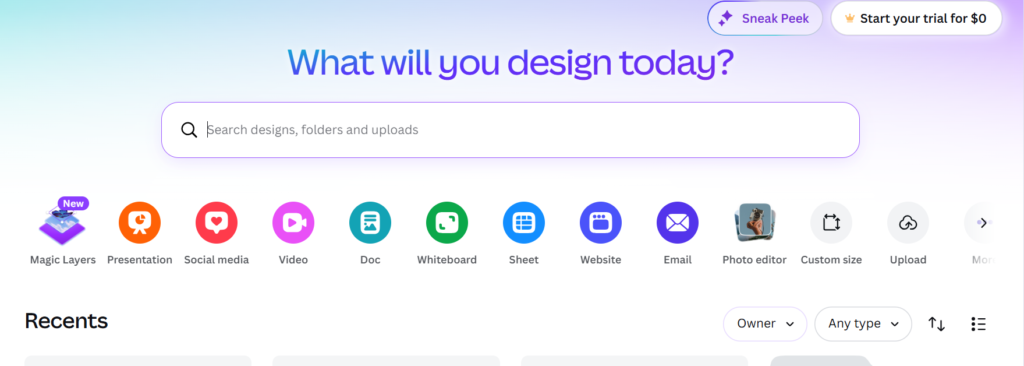
Key Features of Canva Pro
1. Premium Templates
Among the top selling points of Canva Pro is the availability of premium templates.
Rather than creating something out of nothing, you start with a professionally made template and edit:
• The text
• The images
• The colors
• The fonts
• The layout
• The graphics
• The videos
Canva currently features thousands of premium templates for various designs such as documents, presentations, social media posts, etc.
Why it’s important
Say you require a professional advertisement for your Instagram account.
Rather than spending an hour making it from scratch, you can:
Select template → Edit text → Upload logo → Edit colors → Download
2. Magic Resize
One of the most valuable Canva Pro features is Magic Resize.
Imagine that you have already created an Instagram post and now require it for use on:
• Instagram Story
• YouTube
• Presentation
Magic Resize allows you to automatically convert a design into another format without starting over from scratch.
Magic Resize is described by Canva as an automatic reformatting option for various channels within a single click.
Real advantage
For marketers working on multiple social media platforms, this will greatly simplify their lives.
3. Background Remover
Canva Pro offers a single-click background remover function.
The ability is especially helpful for:
• Product images
• Profile photos
• Headshots
• Logos
• Social media graphics
• E-commerce graphics
Instead of having to switch to professional photo editing software, background removal can be done using Canva.
In case of small businesses offering goods online, this feature alone will save you much time.
4. Brand Kit
Consistency of the brand is very crucial for a business.
Canva Pro’s Brand Kit gives you the facility to save your valuable brand assets that include:
• Brand logos
• Brand colors
• Fonts
• Images
• Icons
• Brand templates
• Brand guidelines
and then use them when designing.
As of now, Canva claims that Brand Kit supports up to 100 different brands, which makes it especially helpful for agencies and those who have to manage multiple businesses or their clients.
What’s the point?
For example, let’s assume that you have a brand with:
A particular logo + blue color + a particular font
Instead of having to search for all of them every time, you can just save them on your Brand Kit.
5. Canva AI 2.0
AI is one of the most disruptive factors in the present Canva experience.
Canva AI 2.0 is intended to assist users in turning an idea into a finished design as well as support with creative and repetitive work.
AI can help with aspects including:
• Designing
• Image creation
• Writing
• Editing
• Background generation
• LAYOUT
• Content transformation
For a person who is not a professional designer, this will greatly reduce the entry barrier to visual content creation.
6. Magic Write
Magic Write is Canva’s AI-based writing assistant.
It can be used to create content for:
• Social media captions
• Headlines
• Marketing copy
• Presentation
• Blog content
• Description
Canva states that Magic Write is a tool for content generation on the basis of prompt input while maintaining consistent brand voice.
Example
For instance, you may input:
“Generate five Instagram captions for a new business software product.”
Canva will then provide you with some initial suggestions to work from.
It won’t be a replacement for good human writing, but it will speed up the process.
7. Magic Eraser
Magic Eraser utilizes AI to erase any undesirable content from images.
For instance, your photo may include:
• An unwanted individual
• A distracting item
• Unwanted background
The undesirable item will be erased without requiring sophisticated Photoshop knowledge.
Canva presently includes Magic Eraser in its list of AI-powered Pro tools.
8. Magic Grab and Magic Layers
The more recent additions to Canva’s arsenal of AI capabilities go beyond mere image generation.
Magic Grab allows for identifying the components of an image and moving or resizing them while keeping the rest of the design intact.
Magic Layers take the process one step further by converting a static design into an editable design, which includes the ability to move items and edit text.
9.AI Background Generator
Backgrounds can be generated using text prompts in Canva Pro.
For instance:
“Modern office with glass walls, natural light and a professional business environment.”
The tool will produce a background that can work for marketing design.
This comes in handy when creating:
• Advertisements
• Product photos
• Social media posts
• Presentation slides
• Promotional materials
Currently, Canva offers Background Generator as one of the Pro AI tools.
10. Video Editing
Canva is no longer only a platform for graphics designs.
Now you can create and edit videos using the tool.
Canva allows editing and creation of video content for:
• YouTube
• TikTok
• Presentations
• Advertisements
While Canva Pro offers premium video content and editing services, new tools offer video background removal, captions, and animations powered by AI technology.
Pros & Cons
Pros
• Very user-friendly (even for beginners)
• Vast template and asset collections
• Advanced AI capabilities
• Timesaving features including Magic Resize
• Relatively affordable compared to other products
• It can be used online (installation-free)
Cons
• Lacks advanced editing features (compared to Photoshop)
• The necessity to have an internet connection
• The feeling that some templates may be overused
• Basic video editing
Performance & Personal Experience
Based on my experience of working with content creators and instructing students, Canva Pro suits:
• Creations of social media graphics quickly and professionally
• Drafting visual aids for trainings and classes
• Helping beginners create quality designs without learning Photoshop
Several of my students, previously not confident using photo editors like Photoshop, found Canva Pro very convenient and effective.
Pricing & Benefits
Free Plan
Canva Free includes only basic features:
• Basic templates
• Basic asset collections
• Lack of advanced features
Perfect for people trying Canva out.
Canva Pro Plan (for 2026)
• Monthly: approx. $12.99 per month
• Annual subscription: approx. $119.99 per year
Features Included in this Plan:
• All templates available
• Background remover
• Magic resize
• Brand kit
• AI tools
• Premium stock assets
Is Canva Pro Worth It?
Absolutely yes, especially if you:
• Make visuals regularly
• Roll out social media marketing campaigns
• Conduct businesses or run blogs
Justify the price in terms of time saved alone.
Comparison Table
| Feature | Canva Free | Canva Pro |
| Templates | Limited | Unlimited |
| Background Remover | ❌ | ✔ |
| Brand Kit | ❌ | ✔ |
| AI Tools | Limited | Full Access |
| Storage | 5GB | 1TB |
Top Uses Cases for Canva Pro
1. Bloggers
• Making visual content such as images, Pinterest pins and blog graphics
Boosts engagement with the content created
2. Marketing Experts & Entrepreneurs
• Advertisements on different platforms
• Graphic designs for emails
• Corporate branding designs
3. Students
• Class presentation visuals
• Assignments
• Other visual work assignments
4. Businesses
• Marketing visual materials
• Sell your products visually
• Brand designing
Other Options than Canva Pro
When looking at alternatives to Canva Pro, consider:
1. Adobe Express
• It has better design capabilities than Canva pro
• Also better with integrations
2. Visme
• Works best when making infographics and presentations
3. Crello (VistaCreate)
• Similar to Canva but with fewer capabilities
4. Figma
• Best platform for UI/UX design
Nonetheless, Canva Pro is the easiest tool to use.
Is Canva Pro Worth It in 2026
In Canva Pro review 2026, Canva
Final Verdict: Canva Pro Review 2026
After looking at Canva Pro’s features, AI capabilities, pricing, pros, cons, usage, and alternatives, the conclusion is:
Canva Pro is one of the most excellent all-in-one design suites to have come out in 2026.
The main reason why Canva Pro is excellent is that its strength lies in something other than any single particular feature. It lies in Canva’s combination of:
Design + Templates + Stock + AI + Branding + Photos editing + Video + Social media
into one relatively user-friendly platform. The recently added AI capabilities make it even more powerful. Canva AI 2.0, Magic Layers, Magic Grab, Magic Eraser, Background Generator, Canva Code, and Canva Grow prove how much the platform is diversifying from simple graphic design.
The question is whether you personally need Pro.
If you design only a couple of very simple graphics per month, then Canva Free would suffice.
But if you are a blogger, marketer, student, entrepreneur, creator, or small businessperson who creates visual content regularly, then Canva Pro can help you save considerable time.
Final Rating: 4.8/5
Best for: Bloggers, marketers, students, creators, entrepreneurs, teachers, and small businesses.
Best feature: Integrated and AI-enabled workflow.
Biggest 2026 strength: Combination of Canva AI 2.0 and premium content/productivity features.
Biggest flaw: Professional designers will still need Adobe and other creative software.
Conclusion
Is Canva Pro worth it in 2026? Definitely if you produce visual content often.
While the free version works just fine, Pro starts paying off if you have to use premium content, Brand Kit, Magic Resize, background remover, AI features, and quick content creation.
For the majority of bloggers, marketers, students, and small business owners, Canva Pro can replace many smaller apps into one product.
Canva Pro Review 2026 conclusion: 4.8/5 – Highly Recommended for those who want to make professional visual content fast without having to become a professional designer.
Get a free trial of Canva Pro and discover its advanced capabilities now.